一、問題
試圖編譯外來遊戲時,因為不知道cocos2dx的遊戲引擎版本,
因此
$./build_native.sh
無法通過。
二、解決辦法
在開啟一個全新cocos2dx專案時,其實會將cocos2dx引擎需要被編譯的相關程式整個原封不動的複製到新專案中。
因此在cocos2d.cpp檔裡會記錄著該專案的遊戲版本。
路徑如下︰
YourGameProject/libs/cocos2dx/cocos2d.cpp
打開來後,
就會看到cocos2dx所使用的引擎版本號了。


$(call import-module,Box2D)
$(call import-module,external/Box2D)
cocos2d/platform/jsloader.js --> cocos2d/jsloader.js

 |
| 圖片說明了在cocos2d-JSB的開發環境中, EasyNDK及EasyJSB各自的定位與角色。 |
$git clone https://github.com/lp43/EasyJSB.git


$git submodule update --init --recursive
 |
| 將次模組下載下來後,project就能正常執行了。 |
文章撰寫日期︰2014/01/11 16:11
cocos2d-x使用版本︰2.1.4
Xcode使用版本︰5.0.2
文章來源︰wk3368的專檔


文章撰寫日期︰2014/01/04 12:36
cocos2d-x使用版本︰2.1.4

 |
| 解壓縮下載完後的Admob套件 |


 |
| 添加Framework的方式 |
-ObjC to both
Debug and Release.


\"$(SRCROOT)/../../../scripting/javascript/spidermonkey-ios/lib\"變成
/Users/lp43/cocos2d-x/cocos2d-x2.1.4/scripting/javascript/spidermonkey-ios/lib依此類推。
#import#import "GADBannerViewDelegate.h"//加入這行 @class GADBannerView;//加入這行 @class GADRequest;//加入這行 @interface RootViewController : UIViewController //加入這個Delegate - (void) SampleSelector:(NSObject *)prms; @property(nonatomic, strong) GADBannerView *adBanner;//加入這行 - (GADRequest *)request;//加入這行 @end
#import "RootViewController.h"
#include "IOSNDKHelper.h"

#import "GADBannerView.h"//加入這行
#import "GADRequest.h"//加入這行

@implementation RootViewController

// Override to allow orientations other than the default portrait orientation.
// This method is deprecated on ios6
- (BOOL)shouldAutorotateToInterfaceOrientation:(UIInterfaceOrientation)interfaceOrientation {
    return UIInterfaceOrientationIsLandscape( interfaceOrientation );
}

// For ios6, use supportedInterfaceOrientations & shouldAutorotate instead
- (NSUInteger) supportedInterfaceOrientations{
#ifdef __IPHONE_6_0
    return UIInterfaceOrientationMaskAllButUpsideDown;
#endif
}

- (BOOL) shouldAutorotate {
    return YES;
}

//fix not hide status on ios7
- (BOOL)prefersStatusBarHidden
{
    return YES;
}

- (void)didReceiveMemoryWarning {
    // Releases the view if it doesn't have a superview.
    [super didReceiveMemoryWarning];

    // Release any cached data, images, etc that aren't in use.
}

- (void)viewDidUnload {
    [super viewDidUnload];
    // Release any retained subviews of the main view.
    // e.g. self.myOutlet = nil;
}


- (void)dealloc {
    [super dealloc];
}
- (id)initWithNibName:(NSString *)nibNameOrNil bundle:(NSBundle *)nibBundleOrNil {

    if ((self = [super initWithNibName:nibNameOrNil bundle:nibBundleOrNil])) {

        // 告訴NDKHelper說 RootViewController會回應來自C++的message
        [IOSNDKHelper SetNDKReciever:self];

    }
    return self;
}
- (void) SampleSelector:(NSObject *)prms
{
    NSLog(@"Objective-C端的SampleSelector被呼叫了");
    //加入底下
    // Initialize the banner at the bottom of the screen.
    self.adBanner = [[GADBannerView alloc] initWithAdSize:kGADAdSizeBanner];
    // Note: Edit SampleConstants.h to provide a definition for kSampleAdUnitID before compiling.
    self.adBanner.adUnitID = @"填上你的admob_id";
    self.adBanner.delegate = self;
    self.adBanner.rootViewController = self;
    [self.view addSubview:self.adBanner];
    [self.adBanner loadRequest:[self request]];
}
//加入底下函式
- (GADRequest *)request {
    GADRequest *request = [GADRequest request];

    // Make the request for a test ad. Put in an identifier for the simulator as well as any devices
    // you want to receive test ads.
    request.testDevices = @[
                            // TODO: Add your device/simulator test identifiers here. Your device identifier is printed to
                            // the console when the app is launched.
                            GAD_SIMULATOR_ID,
                            @"如果你要在實機上測試admob,從console裡會有一串實機的編碼,填進這裡"
                            ];
    return request;
}
@end

文章撰寫日期︰2013/12/29 20:04
cocos2d-x使用版本︰2.1.4


 |
| EasyNDK套件檔(cpp檔) |
 |
| Android編譯C++使用的範本檔(Android.mk) |
 |
| EasyNDK在Android端相關的java檔 |

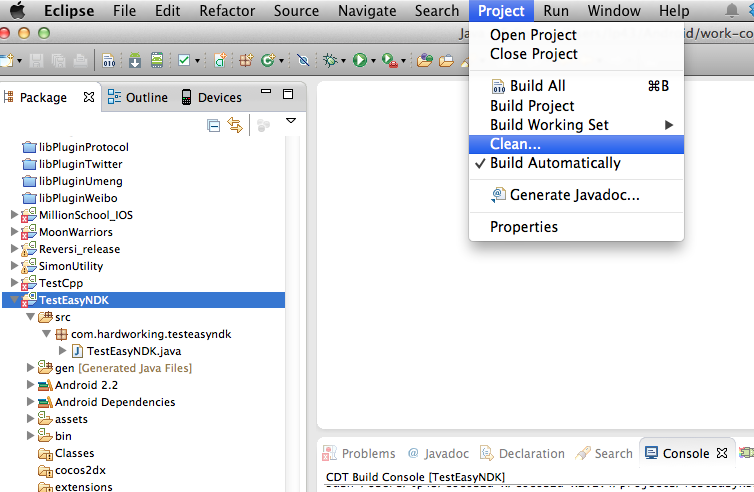 |
| 重新清除TestEasyNDK專案,確保C++檔重新被NDK編譯 |


文章撰寫日期︰2013/12/29 19:25
cocos2d-x使用版本︰2.1.4
$git clone http://github.com/cocos2d/cocos2d-x.git約10~20分鐘後(依您頻寬而定),
$git submodule update --init --recursive
$git tag 版本號
$git tag -l來查詢。
 |
| 上面列岀現在的cocos2d-x有哪些版本可供切換 |
$git tag cocos2d-2.0-x-2.0.2即可完成版本切換。
$./create_project.py -project MyGame -package com.MyCompany.AwesomeGame或
$./create_project.py -project MyGame -package com.MyCompany.AwesomeGame -language javascript就可以輕鬆完成專案的建置。

$./create_project.py就能將跨平臺專案建立起來,
文章撰寫日期︰2013/12/29 16:10
cocos2d-x使用版本︰2.1.4
$git clone https://github.com/aajiwani/EasyNDK-for-cocos2dx.git


 |
| 記得選成Create groups for any added folders |

文章撰寫日期︰2013/11/30 21:53
cocos2d-x使用版本︰2.1.5
this.runAction();沒有執行預定動作的問題。
cc.Director.getInstance().getActionManager().resumeTarget(this);問題解決。
文章撰寫日期︰2013/11/30 20:19
cocos2d-x使用版本︰2.1.5
this.runAction()
無法執行/沒有回應的問題。this.runAction()
關掉loop動畫即可。
文章撰寫日期︰2013/11/30 18:42
cocos2d-x使用版本︰2.1.5
bool CCSize::equals(const CCSize& target) const
{
    return (fabs(this->width  - target.width)  < FLT_EPSILON)
        && (fabs(this->height - target.height) < FLT_EPSILON);
}
報EXC_BAD_ACCESS導致crash問題。
// Creates and return a button with a default background and title color.
        var backgroundButton = cc.Scale9Sprite.create(s_extensions_button);
        var backgroundHighlightedButton = cc.Scale9Sprite.create(s_extensions_buttonHighlighted);

        var titleButton = cc.LabelTTF.create(title, "Marker Felt", 30);

        titleButton.setColor(cc.c3b(159, 168, 176));

        var button = cc.ControlButton.create(titleButton, backgroundButton);
        button.setBackgroundSpriteForState(backgroundHighlightedButton, cc.CONTROL_STATE_HIGHLIGHTED);
        button.setTitleColorForState(cc.WHITE, cc.CONTROL_STATE_HIGHLIGHTED);
文章撰寫日期︰2013/11/26 15:00
cocos2d-html5使用版本︰2.1.5
            cc.Loader.preload(ccb_resources, function () {
            cc.Director.getInstance().runWithScene(new this.startScene());
        }, this);
改成
            cc.LoaderScene.preload(ccb_resources, function () {
            cc.Director.getInstance().replaceScene(new this.startScene());
        }, this);
就可以囉! |
| 這就是LoaderScene |
// Needed for HTML5
var cocos2dApp = cc.Application.extend({
    config:document['ccConfig'],
    ctor:function (scene) {
        this._super();
        this.startScene = scene;
        cc.COCOS2D_DEBUG = this.config['COCOS2D_DEBUG'];
        cc.initDebugSetting();
        cc.setup(this.config['tag']);
        cc.AppController.shareAppController().didFinishLaunchingWithOptions();
    },
    applicationDidFinishLaunching:function () {
        // initialize director
        var director = cc.Director.getInstance();

        // enable High Resource Mode(2x, such as iphone4) and maintains low resource on other devices.
//     director->enableRetinaDisplay(true);

        // turn on display FPS
        director.setDisplayStats(this.config['showFPS']);

        // set FPS. the default value is 1.0/60 if you don't call this
        director.setAnimationInterval(1.0 / this.config['frameRate']);

        //load resources
        cc.LoaderScene.preload(ccb_resources, function () {
            cc.Director.getInstance().replaceScene(new this.startScene());
        }, this);

        return true;
    }
});
var myApp = new cocos2dApp(CCBMainScene);
文章撰寫日期︰2013/11/22 16:19
cocos2dx使用版本︰v 2.1.5


文章撰寫日期︰2013/11/22 10:42
cocos2dx使用版本︰v 2.1.4
sys.localStorage.setItem("mykey","我是中文");
然後使用sys.localStorage.getItem("mykey");
欲取岀"我是中文"字串時,
#include "ScriptingCore.h"
JSBool JSB_localStorageGetItem(JSContext *cx, uint32_t argc, jsval *vp) {
 JSB_PRECONDITION2( argc == 1, cx, JS_FALSE, "Invalid number of arguments" );
 jsval *argvp = JS_ARGV(cx,vp);
 JSBool ok = JS_TRUE;
 const char* arg0;

 ok &= jsval_to_charptr( cx, *argvp++, &arg0 );
 JSB_PRECONDITION2(ok, cx, JS_FALSE, "Error processing arguments");
 const char* ret_val;

 ret_val = localStorageGetItem((char*)arg0  );

// jsval ret_jsval = charptr_to_jsval( cx, ret_val);
    jsval ret_jsval = c_string_to_jsval(cx, ret_val ? ret_val : "");//加入這行

 JS_SET_RVAL(cx, vp, ret_jsval );

 return JS_TRUE;
}

